Report Preview and Publishing are essential features in ReadyWorks Report Builder that allow you to validate your report's appearance and functionality, and then make it available to other users. These features ensure that your reports are accurate, effective, and accessible to the right audience.
Report Preview
The Preview function allows you to see how your report will look and behave before finalizing it. To use the preview feature:
- Click the 'Preview' button while building or editing your report
- Review the report layout, including all columns, filters, and action buttons
- Test interactive elements like filters and sorting to ensure they work as expected
- Verify that data is displaying correctly and RAG statuses are accurate
When previewing, pay attention to:
- Column order and width: Ensure the most important information is easily visible
- Filter functionality: Test top-level and column filters to confirm they return expected results
- Action button behavior: Verify that buttons are active when appropriate and perform the correct actions
- Data accuracy: Cross-check a sample of data against source systems to ensure correctness
Use the preview function iteratively as you build your report. It's often helpful to preview after each major change, rather than waiting until the end of the report-building process.
Deploying your Report
Once your report is finalized and tested, you can deploy it to make it available to other users. The deployment process involves several considerations:
1 - Access Control:
Determine who should have access to reports. ReadyWorks allows you to restrict access to reporting based on user roles or groups. Consider:
- Which teams need this report?
- Should access be read-only or include edit rights?
- Are there any sensitive data elements that require additional restrictions?
2 - Naming Convention:
Use a clear, consistent naming convention for organizing your reports. This might include:
- A prefix indicating the report type or project
- A brief description of the report's purpose
- A version number or date, if appropriate
3 - Documentation:
Provide context for your report users. This might include:
- A brief description of the report's purpose and contents
- Explanations of any custom calculations or statuses
- Guidelines for using interactive elements like action buttons
4 - Schedule and Distribution:
Consider whether the report should be:
- Available on-demand in the ReadyWorks interface via:
- The ReadyWorks reporting tab, which requires a ReadyWorks login to view the report
- Publishing the report to create a shareable URL, which does not require a ReadyWorks login to view the report
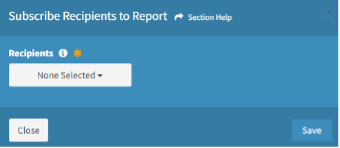
- Automatically generated and distributed via e-mail attachment on a regular schedule via the report builder ‘Subscribe Recipients to Report’ module.
- Exported to other systems or formats (e.g., CSV, PDF)
To Deploy your Report
- From the Report Builder interface, select 'Create Report'
- Configure access permissions (binary only – access to all or none)
- Set the report location and name
- Add any necessary documentation or instructions
- Configure any automated scheduling or distribution
Best Practices for Report Preview & Publishing
- Plan Permissions: Understand that access to Reports are a binary selection – you grant access to all reports or no reports. ReadyWorks does not currently support granular Permissioning.
- Test thoroughly: Use the preview function extensively before publishing
- Seek feedback: Have other team members review the report before wide release
- Start small: Consider a phased rollout for complex reports
- Monitor usage: Track how often the report is used and by whom to ensure it's meeting needs
- Maintain and update: Regularly review published reports to ensure they remain relevant and accurate
By effectively using the Preview and Publishing features, you ensure that your reports are not only accurate and functional but also readily available to those who need them. This supports efficient decision-making and operations across your IT environment.
Remember, a well-designed and properly deployed report can become a key tool for your team, providing crucial insights and enabling swift action. Take the time to get it right, and you'll create a valuable asset for your entire IT operation.