Data Source Selection is the cornerstone of report creation in ReadyWorks Report Builder. This critical first step determines the scope and structure of your report, serving as the foundation for all subsequent data analysis and presentation.
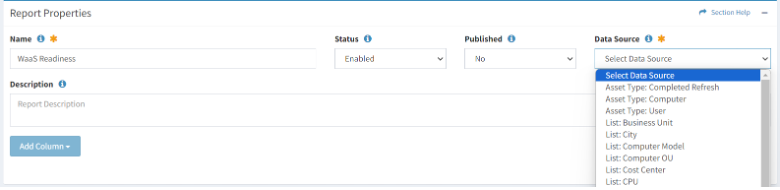
When initiating a new report, you'll be prompted to choose a primary data source from options such as:
- Computer
- User
- Application
- Network Device
- Custom asset types (if configured in your ReadyWorks instance)
Your selection defines the main entity around which your report will be built. For example, if you're overseeing a large-scale Windows servicing project, you'd likely choose 'Computer' as your primary data source. This allows you to report on:
- Computer-related attributes (OS versions, hardware specifications)
- Data from linked assets (users, installed applications)
The choice of primary data source influences which linked asset data you can include in your report. ReadyWorks uses a relational data model, meaning assets are interconnected. When you select 'Computer' as your primary source, you gain access to:
- All computer fields
- Fields from directly related assets (Users, Applications)
This linked asset access is powerful but requires careful consideration. While it enables rich, multidimensional reporting, it can impact report generation time and system load, especially with assets having large data volumes or complex relationships.
Consider a scenario where you need to report on software distribution across your environment. Choosing 'Application' as your primary data source would allow you to see:
- Which applications are installed across different computers
- Potential links with user information for a comprehensive view of software usage and distribution
It's crucial to plan your data source selection carefully, as it cannot be changed once the report is created without starting over. Consider:
- The primary focus of your report
- Which data points are essential
- The relationships between different asset types in your environment
By thoughtfully selecting your data source, you lay the groundwork for creating efficient, insightful reports that directly support your operational needs. Remember, the goal is to strike a balance between comprehensive data inclusion and report performance, ensuring that your reports provide valuable insights without unnecessary complexity or system strain.