Introduction to ReadyWorks
Welcome to ReadyWorks! This guide is designed to help you understand how to use ReadyWorks effectively, especially if you're new to the platform. We'll walk you through the key concepts, explain the steps you'll take, and most importantly, help you understand how data flows through the system.
What is ReadyWorks?
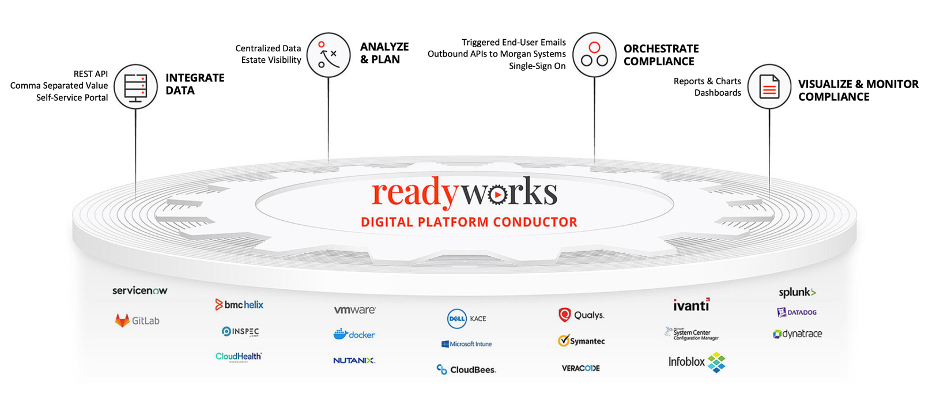
ReadyWorks is a powerful platform designed to help organizations manage their assets efficiently. It acts as a Digital Platform Conductor, integrating various systems and providing a unified view of your asset estate, supporting processes, and corresponding data. Whether you're upgrading to Windows 11, migrating VM hypervisors, or orchestrating complex operational processes, ReadyWorks helps you streamline operations by connecting to different data sources, consolidating information, and automating workflows.
Key Features and Capabilities
1. Enterprise-Grade Automation:
ReadyWorks offers a robust automation platform that integrates with a wide range of enterprise systems through its ETL (Extract, Transform, Load) capabilities. This allows it to ingest and normalize data from disparate sources, such as device management systems, ticketing tools, and business applications, offering a consolidated view for better decision-making. The platform excels in handling data migration, device refresh projects, and IT operations at scale.
2. Centralized Data Management and Insights:
Once data is ingested, ReadyWorks maps it into structured asset tables through SQL-driven processes, ensuring consistent and rationalized records. It offers custom reporting and dashboards that provide clear insights into key metrics, such as asset utilization and compliance, which can be tailored to business needs.
3. Self-Service and Workflow Automation:
ReadyWorks includes a Self-Service Portal that allows end-users to engage directly with their assigned assets, triggering workflows like device refreshes or updates through TCOMMs (Triggered Communications). These communications are critical for ensuring user participation in large-scale initiatives such as system upgrades or migrations.
4. Waves for Bulk Operations:
The platform is built to handle large-scale operations through the use of “Waves,” where related assets can be grouped and processed together. This feature is particularly useful in migration and refresh scenarios, allowing IT teams to efficiently manage thousands of assets simultaneously.
5. Governance and Compliance:
ReadyWorks ensures that governance and compliance are maintained across workflows by offering detailed audit trails, real-time monitoring, and the ability to enforce policies across all users. This is critical for organizations managing sensitive corporate data and seeking to ensure security and data integrity throughout their operations.
6. Integrations and Extensibility:
ReadyWorks integrates seamlessly with external systems through its ETL connectors, supporting both cloud and on-premises environments. The platform also offers REST API support, allowing organizations to extend its capabilities or connect to systems not natively supported by ReadyWorks, without requiring complex custom development.
7. ReadyWorks for IT and Business Users:
The platform is designed to be usable by both technical IT staff and business users, providing powerful tools for automation that don’t require extensive coding knowledge. This citizen integrator approach ensures that both groups can benefit from the same productivity enhancements.
In summary, ReadyWorks provides a comprehensive solution for automating workflows, managing assets, and integrating data across your organization, helping businesses achieve operational efficiency and improved governance.